Choosing Between Ableton Live and FL Studio: A Simple Guide for Music Makers
Hey there, if you’re just starting out making music or you’ve been tinkering for a while, picking the right software can feel like a big deal. Ableton vs FL Studio, which is your choice? Two popular choices are Ableton Live, made by the team at Ableton, and FL Studio, created by Image-Line. Both help you create beats, record sounds, and mix tracks, but they work in different ways. Maybe you’re into electronic tunes or want something easy for hip-hop beats.
First off, think about why these two stand out. Ableton Live is great for playing music live on stage or messing around with ideas quickly. FL Studio shines when you’re building patterns and loops from scratch. Lots of folks compare them because they’re both powerful for electronic music, but one might click better depending on what you do. Let’s dive in and explore each part.
A Quick Look Back: How These Tools Got Started
Understanding where something comes from can help you see why it works the way it does. Ableton Live kicked off in 2001. The folks at Ableton wanted a tool that let musicians perform live without stopping the flow. It started as something for DJs and electronic artists to trigger clips and loops on the fly. Over the years, it grew into a full setup for recording and editing too. Now, in its latest versions, it handles everything from simple beats to complex mixes.
FL Studio Mobile has been around even longer, starting in 1997 as FruityLoops. Image-Line built it for making loops and patterns easily, especially for dance and hip-hop. It was all about fun and quick results at first. As time went on, they added more features like audio recording and better mixing. Today, it’s a complete package that many producers use for everything from trap beats to pop songs. Both have come a long way, but their roots show: Ableton feels alive and flexible for shows, while FL Studio is like a playground for building sounds layer by layer.
The Look and Feel of Ableton vs FL Studio
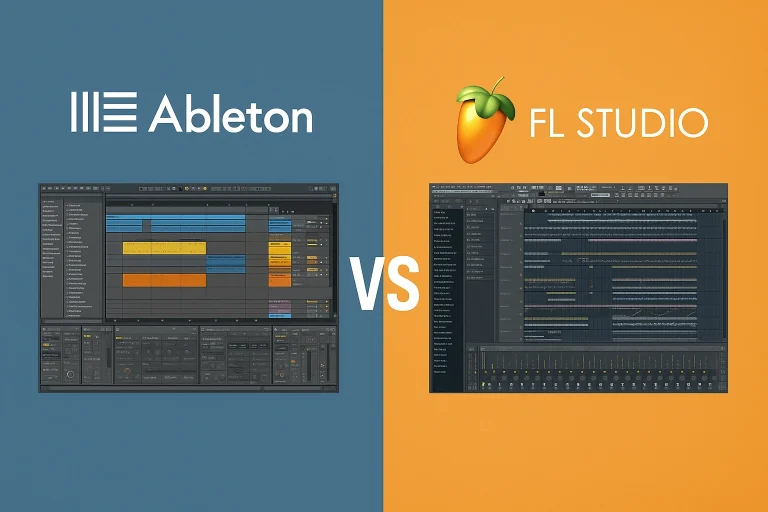
When you open up software, the first thing you notice is how it looks and how easy it is to find stuff. Ableton Live keeps things clean. It has two main views: one for arranging tracks in a straight line, like a timeline, and another called Session View where you can launch clips like puzzle pieces. Imagine you’re at a desk with buttons to play different sounds whenever you want. The colors are simple, and you can zoom in or out easily. It’s not too crowded, which helps if you’re new.
FL Studio, on the other hand, gives you more windows to play with. There’s a channel rack for your instruments, a playlist for putting everything together, and a mixer for adjusting volumes. The piano roll is a standout—it’s like a grid where you draw notes for melodies. You can move things around and make it fit your screen. Some say it looks busier at first, but once you get used to it, it’s super handy for tweaking details.
Which one feels better? If you like jumping between ideas without a plan, Ableton’s setup might suit you. For those who enjoy organizing patterns step by step, FL Studio’s layout could be more fun. Both let you customize colors and shortcuts, so you can make them your own after a bit of practice.
Workflows That Make Music Happen
Making music isn’t just about buttons—it’s about how the software lets you create. In Ableton Live, the workflow is all about speed and trying things out. You start in Session View, dropping in loops or recording bits, then switch to Arrangement View to line them up. It’s like sketching ideas and then building a full picture. For example, if you’re making a house track, you can loop a bassline, add drums on top, and twist knobs in real time to change sounds. It feels natural for experimenting, especially if you plug in a controller like a keyboard.
FL Studio works more like stacking blocks. You build patterns in the channel rack—maybe a drum beat or a synth melody—then drop them into the playlist to arrange. The step sequencer lets you click in rhythms without playing them live. Say you’re crafting a trap beat: you can loop a hi-hat pattern, layer a kick, and edit notes precisely in the piano roll. It’s great for perfecting small parts before putting the whole song together.
Both handle automation, which means changing volume or effects over time, but Ableton makes it quicker for live tweaks. FL Studio pc gives more control for detailed edits. If you’re a beginner, FL might feel easier for starting simple beats, while Ableton rewards you for playing around.
Key Features of Ableton vs FL Studio
Now, let’s get into the tools inside. Ableton vs FL Studio, both have tons of built-in stuff, but they shine in different spots.
Ableton vs FL Studio: Why Pick One Over the Other
Each has perks depending on who you are. For beginners, FL Studio often feels welcoming because you can make a beat in minutes without overthinking. It’s like playing with Lego—build small, then connect. Ableton benefits those who want to grow into live shows, teaching you to think on your feet.
Pros love Ableton for collaboration and fast sessions. Benefits include saving CPU by freezing tracks, so your computer doesn’t slow down. FL Studio benefits from lifetime updates, meaning you buy once and get new features free forever. That’s huge if you’re on a budget.
For genres, both crush electronic stuff. Ableton fits techno or house where live mixing matters. FL Studio nails trap or pop with its pattern focus. Benefits extend to education too—both have tutorials, but FL’s community shares tons of free presets.
Think about portability. Ableton runs smooth on laptops for gigs. FL Studio is lightweight, great for older machines.
Technical Details
Don’t worry, these aren’t super demanding. For Ableton Live, you need Windows 10 or later, or macOS 11 and up. Aim for an Intel or Apple processor, 8GB RAM minimum, but 16GB is better for big projects. It uses about 3GB install space, plus more for sounds. It’s 64-bit only, so check your system.
FL Studio works on Windows 8.1+ or macOS 10.13+. Similar RAM needs—8GB min, but more helps. Install size is around 2GB, and it’s also 64-bit. Both handle high-res screens and touch if you have that.
Compatibility wise, they play nice with most audio interfaces for low-latency recording. Ableton supports ASIO on Windows for better performance. FL does too, plus Core Audio on Mac.
Updates keep them fresh. Ableton releases big versions with paid upgrades sometimes. FL’s lifetime deal means no extra cost for fixes or new tools.
How to Install: Step-by-Step Guides(Ableton vs Fl studio)
Getting started is easy. For Ableton Live:
- Go to ableton.com and download the trial or buy a version.
- Run the installer—it’s an EXE on Windows or DMG on Mac.
- Follow prompts: agree to terms, choose folder (default is fine).
- Launch it, authorize with your account or code if bought.
- Download extra packs from the browser inside the app.
- Set up audio settings: pick your sound card, adjust buffer for no crackles.
For FL Studio:
- Head to image-line.com, grab the demo or purchase.
- Open the installer file.
- Accept license, select install path.
- Start the program, unlock with regkey if paid.
- It auto-scans plugins, but you can add folders manually.
- Tweak audio options in settings for your setup.
Both take under 10 minutes. Trials let you test fully, but saving might be limited in demos.
Pros and Cons
For Ableton Live:
Pros
Cons
For FL Studio:
Pros
Cons
Both are solid, but pick based on your weak spots.
Pricing: What It’ll Cost You
Money matters. Ableton Live has tiers: Intro at about $99 for basics, Standard around $449 with more tools, Suite at $749 for everything. They offer discounts for students. No subscriptions, but major updates might need payment.
FL Studio starts cheaper: Fruity Edition $99 (no audio clips), Producer $199 (full recording), Signature $299 (extra plugins), All Plugins $499. Best part? One-time buy with free updates forever. Demos are available for both to try.
If you’re comparing costs to other music tools out there, FL often wins for value over time.
Which One Should You Go For?
It depends on you. If you dream of playing live or love experimenting, grab Ableton Live. For beatmakers who want precision and don’t mind learning patterns, FL Studio is a winner. Try the trials—make a simple track in each and see what feels right. Many switch later, but starting with one builds skills fast.
Both are top picks for electronic music production, similar to how folks weigh options in free beat-making apps versus paid ones. In the end, the best is what keeps you creating.
FAQs: Ableton Vs fl Studio
There you have it—a full rundown to help you choose. Music making should be fun, so pick what excites you and start jamming.